
How We Built a WordPress Plugin That Automatically Gets Your WooCommerce Pages Indexed on Google
If you run an online store, you already know the frustration. You add new products, update your categories, create new pages, and then you wait. Sometimes Google finds them in a few days. Sometimes it takes weeks. And sometimes, pages just sit there, completely invisible in search results, for no obvious reason.
That’s the problem we decided to fix.
We built a WordPress plugin called GSC Indexer, a tool that connects directly to Google Search Console and automatically makes sure every single page on your WooCommerce store gets found and indexed by Google. No waiting, no guessing, no manual work.
Here’s the full story of what we built, how it works, and why it could make a real difference for your store.
The Problem Every WooCommerce Store Owner Faces
Let’s say you have a WooCommerce store with 500 products. Each product has its own page. You also have product categories, tags, and attribute pages (like /color/red/ or /size/large/). That can easily add up to 800, 1,000, or even 2,000+ pages on your site.
Google doesn’t automatically know when you add or update those pages. It crawls the web on its own schedule, which means:
- New products can take weeks to appear in search results
- Updated pages might still show old information in Google for days
- Entire sections of your store could be completely missing from Google
The traditional fix is to go into Google Search Console manually, paste the URL, click “Request Indexing,” and do it one page at a time. If you have 500 products, that’s 500 separate manual actions. Nobody has time for that.
What GSC Indexer Does
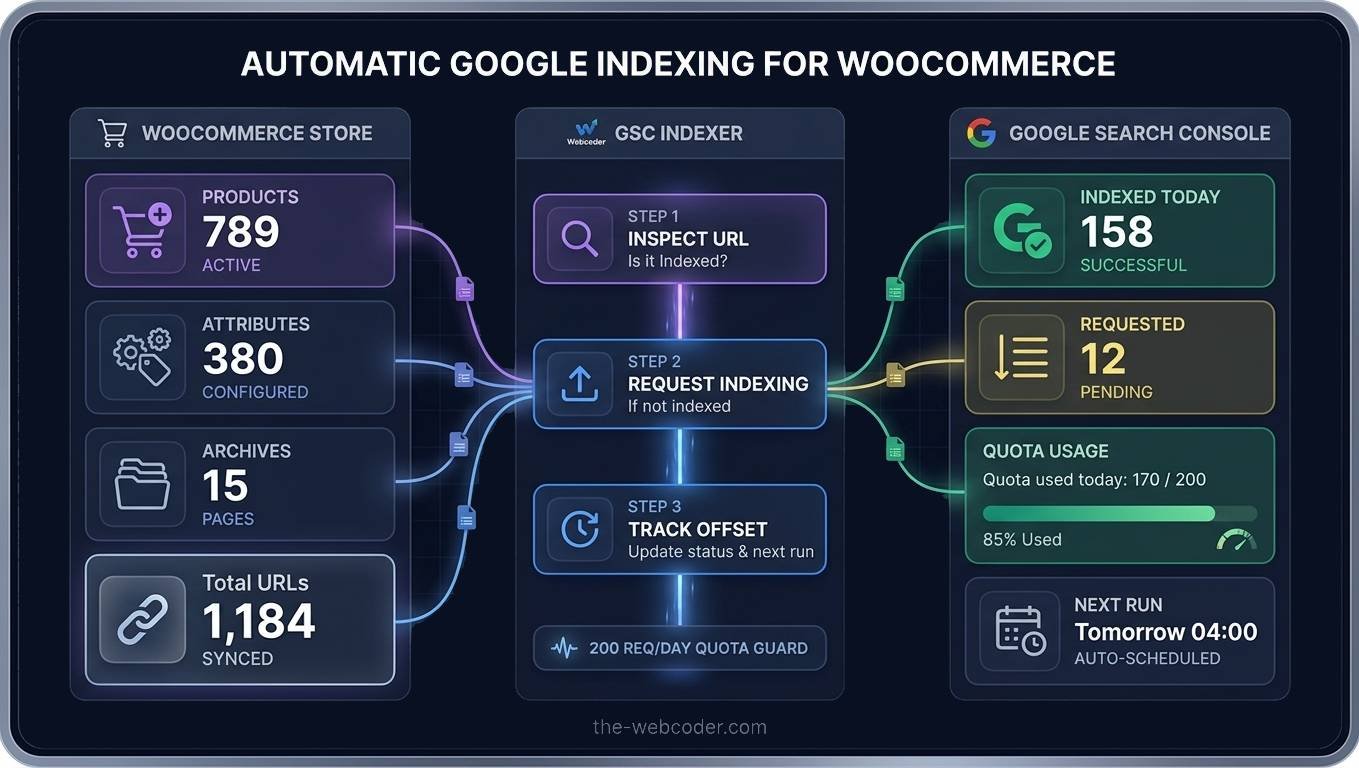
GSC Indexer automates all of that. It runs quietly in the background every single day, checking every page on your store and making sure Google knows about it.
Here’s what it does in plain English:
It never exceeds Google’s daily limits. Google allows 200 indexing requests per day. The plugin tracks exactly how many have been sent today and stops at 200, no exceptions. This keeps your Google account in good standing.
It checks every page, products, product categories, product tags, attribute archive pages (like all your /color/ pages), and asks Google: “Is this page already in your index?”
If Google says yes — great, move on.
If Google says no, the plugin immediately sends a request to Google saying, “Please index this page.” Google usually acts on these requests within 24–48 hours.
It comes back the next day and checks again. Any pages that still aren’t indexed receive another request. This continues automatically until every page is indexed.
The Three Types of Pages It Covers
One thing that sets this plugin apart is that it treats different page types separately. Each runs on its own schedule, so they don’t interfere with each other.
1. Products
These are your individual product pages, the pages that actually sell things. For most stores, this is the largest group. The plugin works through them in batches, picking up exactly where it left off the day before, so no page is ever skipped or checked twice unnecessarily.
2. Attribute Archive Pages
These are pages like /product-attribute/color/blue/ or /product-attribute/size/medium/. A lot of store owners don’t even realise these pages exist, but they do, and they can rank really well in Google for specific searches like “blue running shoes” or “medium winter jacket.” The plugin finds all of them automatically and gets them indexed too.
3. Product Archives (Categories, Tags, and the Shop Page)
Your category pages (/product-category/shoes/), tag pages, and the main shop page are often some of the most valuable pages on your site for SEO. The plugin makes sure these are always indexed and up to date.
How We Built It, The Technical Side (Explained Simply)
For those who are curious about what’s going on under the hood, here’s a simple breakdown.
The plugin uses two Google APIs:
Google Search Console URL Inspection API. This is how the plugin “asks” Google whether a specific page is indexed or not. It’s the same check you’d do manually in Search Console, but automated.
Google Indexing API. This is how the plugin “requests” that Google index a page. It’s a direct line to Google that says, “This page is ready, please come and look at it.”
To use these APIs, the plugin connects using a Google Cloud Service Account, basically a special Google account with a private key that lets your website talk to Google’s systems securely. You set this up once, paste the key into the plugin settings, and then you never have to touch it again.
The Smart Offset System
One of the features we’re most pleased with is the offset tracking. Here’s why it matters.
If you have 789 products and you’re checking 170 per day, you don’t want to check the same first 170 products every single day. That would mean products 171–789 never get checked at all.
So the plugin remembers exactly where it stopped. Day 1, it checks products 1–170. Day 2, it picks up at 171 and checks 171–340. Day 3, it’s 341–510. And so on, cycling through your entire catalogue continuously.
When it reaches the end, it starts over from the beginning, because pages that were indexed last month might have been accidentally removed from Google’s index since then. The cycle never stops.
The Daily Quota Guard
Google’s Indexing API allows 200 requests per day. If you accidentally send more than that, your requests start getting rejected.
The plugin has a built-in counter that tracks every indexing request sent today. The moment it hits 200, it stops sending requests, even if there are more pages to check. It still inspects those pages (which use a different, much more generous quota) and logs them, but it doesn’t send indexing requests until the counter resets at midnight.
This means you can run the plugin manually as many times as you want during the day without worrying about accidentally blowing past Google’s limits.
What You See in the Dashboard
We spent a lot of time making the dashboard genuinely useful rather than just a wall of numbers.
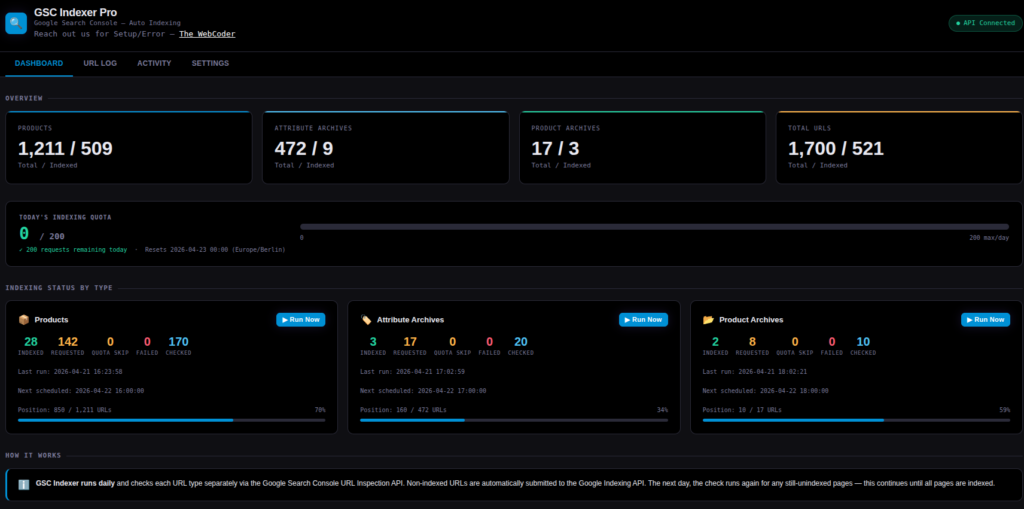
Today’s Quota Meter: A live bar showing how many of your 200 daily requests have been used. It turns orange when you’re getting close and red when you’ve hit the limit, with a clear message explaining that requests are paused until midnight.
Per-Type Progress Bars: Each of the three URL types (products, attributes, archives) has its own progress bar showing how far through the full list today’s run got. You can see at a glance: “Products: position 340 out of 789.”
URL Log: A filterable table showing every single URL the plugin has ever checked, its current status (Indexed, Indexing Requested, Quota Skipped, Failed), and how many times an indexing request has been sent for it.
Activity Log: A timestamped log of everything the plugin has done, every API call, every batch run, every error, so if something goes wrong, you can see exactly what happened.
Adjustable Batch Sizes: In Settings, you can set exactly how many of each type to process per day. The page shows a live quota meter that updates as you type, and warns you if your settings would exceed 200 requests/day.
The Real-World Benefits for Your Store
Let’s talk about what this actually means for your business.
Faster Rankings for New Products
When you add a new product, it usually takes Google days or even weeks to find it through normal crawling. With this plugin, it gets submitted to Google the same day or within 24 hours at most. That means it can start ranking sooner.
More of Your Store Visible in Google
A lot of WooCommerce stores have pages that have simply never been indexed. Attribute archive pages, in particular, are often completely absent from Google. Getting these pages indexed means more entry points into your store from search.
Better Rankings for Category Pages
Category pages are often the most valuable pages for SEO because they can rank for broader terms. Making sure Google always has the latest version of your category pages, especially after you update them, means they’re more likely to rank well.
Less Manual Work
If you’ve ever spent an afternoon copying and pasting URLs into Google Search Console one by one, you’ll understand how much time this saves. The plugin does it all automatically, every day, forever.
Peace of Mind
Even if everything is going fine today, stores change constantly. Products get added and removed, categories get restructured, and new attributes get created. This plugin means you never have to worry about whether Google is keeping up, because something is watching it for you.
Who Is This Plugin For?
This plugin is most useful if:
- You have a WooCommerce store with more than 50 products — smaller stores can usually manage manually, but once you’re past 50, it becomes very time-consuming
- You add new products regularly and want them to be found by Google quickly
- You care about ranking for specific product attributes like colour, size, material, or brand
- You’ve noticed that some of your pages don’t appear in Google even months after publishing them
- You want to automate your SEO workflow so you can focus on running your business instead
FAQs
Will this get my pages ranked on Google? The plugin gets your pages indexed, meaning Google knows they exist and has them in its database. Whether they rank well depends on your SEO, content quality, and competition. But you can’t rank at all if you’re not indexed, so this is an essential first step.
Is it safe to use? Yes. The plugin uses Google’s own official APIs through a secure service account. It respects Google’s rate limits and never sends more requests than Google allows. It’s the same process Google recommends for large sites that need fast indexing.
How long does it take to index a page after requesting it? Usually between a few hours and 48 hours. Google processes these requests quickly, but it’s not instantaneous.
Does it work with any WordPress site or just WooCommerce? The current version is specifically built for WooCommerce stores because it understands products, product categories, attribute archives, and the shop page. A general WordPress version could be built to cover posts, pages, and custom post types.
What if I have thousands of products? The plugin handles large stores well. With the default setting of 170 products per day, a store with 1,700 products would work through the entire catalogue once every 10 days, continuously cycling and catching any pages that fall out of the index.
Ready to Get Your Store Properly Indexed?
If you’ve read this far, you probably already know that getting your pages properly indexed on Google isn’t optional; it’s the foundation of everything else in SEO. You can have the best content, the best products, and the best prices, but if Google can’t find your pages, none of it matters.
GSC Indexer takes this off your plate completely. Set it up once, and it runs every day without you having to think about it.
Want This Set Up on Your Store?
Building and configuring this properly, setting up the Google Cloud project, enabling the right APIs, creating the service account, and getting everything connected, takes time if you’ve never done it before.
The WebCoder can handle the entire setup for you. Whether you just need the plugin installed and configured, or you want a full SEO audit of what Google has and hasn’t indexed on your store, we’re here to help.
We work with WooCommerce store owners who want their sites to actually perform in search, not just look good, but bring in real traffic and real customers.
Get in touch with The WebCoder: the-webcoder.com
Tell us about your store, how many products you have, and what you’re trying to achieve with SEO. We’ll take it from there.

Article written by
The WebCoder
We are skilled in all aspects of web design, from planning and development to design and testing. I also have experience in web development technologies.